Deployments in Lumi
Deployments are how you share your interactive content with learners in Lumi—and how you collect their responses.
They turn your content into a live activity that can be accessed via:
🔗 A direct link
🌐 An embedded widget (e.g. in your LMS or website)
📱 A QR code
At the same time, deployments store all learner interactions and answers.
What is a Deployment?
A deployment is a shared instance of your content, typically used for a specific group of learners (e.g. a class).
When you create a deployment:
Your content becomes accessible via a link, embed, or QR code
Multiple learners can access the same deployment
Each learner’s responses are stored individually, but all within that deployment
Think of a deployment as a container for one activity, where:
The content is shared with a group
Each learner interacts with it separately
All responses are collected in one place
What Are Deployments Used For?
Deployments are used whenever you want learners to actively work with your content.
Common use cases:
Classroom activities
Homework or assignments
Assessments and quizzes
Embedding in LMS or websites
How Responses Work
Each deployment collects responses from all learners who access it.
Every learner interaction is stored separately
All responses belong to the same deployment
You can review results per learner and per activity
Important:
A new deployment starts with no responses
Responses are not shared across deployments
How to Deploy Content
In the H5P Content Editor:
Click “Share”.
Select “As Lin, QR Code or Embed”.
Give a name and select options.
Click “Save”.
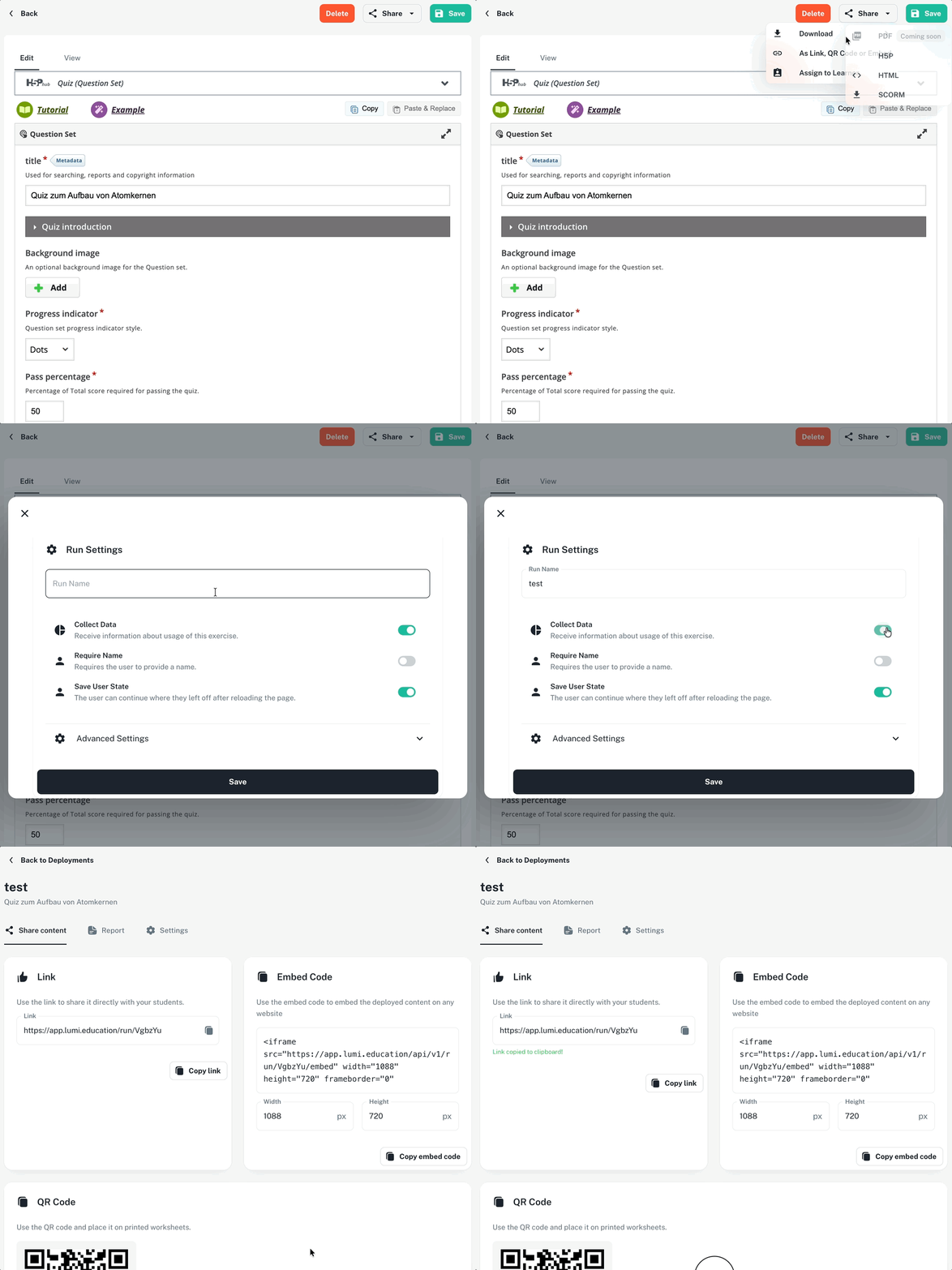
Deployment Settings
Collect Data → Enable to store responses
Require Name → Recommended for tracking learners
Save User State → Allows learners to continue later
Best Practices
Use one deployment per class
Enable Require Name
Use QR codes in class
Create separate deployments for different groups
Was this helpful?
Still need help? Ask the team